Posted by: Jack Henry | June 5, 2014

Nifty Nuggets: More Capitalization

Here are some additional tidbits about capitalization, most of which is from the JHA Style Guide for Technical Communication and Training.

Guideline Example
In titles, do not capitalize articles (a, and, the) or coordinating conjunctions (and, but, or, for, nor). Incorrect: James And The Giant Peach

Correct: James and the Giant Peach

Aside from titles and headings, use capitalization sparingly. Use lowercase unless there is a specific reason to use capitalization, such as:

· proper nouns: specific name of a person, place, thing or title of work (but not common nouns: generic name of a person, place, or thing)

· product and application names (do not capitalize when using as a generic term)

Symitar’s Client Support Department offers 24-hour assistance.

Incorrect: The Credit Union may want to establish Tracking records in Episys.

Correct: The credit union may want to establish Tracking records in Episys.

The Overdraft Protection module provides ways to prevent overdrafts from occurring. Many financial institutions provide overdraft protection to customers.

Do not capitalize the word browser except in a title. Correct: To open the browser session, click the Silverlake – 20/20 Browser link.

Thank you,

Jackie Solano

Technical Writer, Episys Technical Publications

Symitar®

8985 Balboa Avenue

San Diego, California 92123

Direct Line: 619-542-6711

NOTICE: This electronic mail message and any files transmitted with it are intended
exclusively for the individual or entity to which it is addressed. The message,
together with any attachment, may contain confidential and/or privileged information.
Any unauthorized review, use, printing, saving, copying, disclosure or distribution
is strictly prohibited. If you have received this message in error, please
immediately advise the sender by reply email and delete all copies.


Posted by: Jack Henry | June 4, 2014

Editor’s Corner: Alphabetizing Street Names

First, I must apologize for an error I made the other day when typing. When I provided Grammar Girl’s information on the correct way to begin an email or letter, I left out the period on the second example. The examples should read:

Dear John, (correct)

Hi, John. (correct)

Hi John, (common usage but not technically correct)

And now, for some Q&A from the Chicago Manual of Style:

Question:

I have a disagreement with a coworker about how to alphabetize street names with foreign words in them. I live in San Diego, so there are a lot of Spanish street names. I, for example, would file Via Hacienda under V. She argues that because Via means “street,” it should be under H instead. She reasons that if it were House Street, we would file it under H. My argument is that since we are not speaking Spanish, we should follow standard English alphabetizing rules.

Answer:

You are right; there could be any number of foreign-language terms among the street names in San Diego, and unless all readers knew all the languages, the list would be useless. You can see that the city government of San Francisco puts Via Bufano under V.

In other words, if you are multilingual, fantastic! But don’t alphabetize according to translations to English, alphabetize street names according to the spelling on the sign.

Kara Church

Technical Editor, Advisory

Posted by: Jack Henry | June 3, 2014

Nifty Nuggets: Capitalization in Titles

Welcome new subscribers! Last week we began reviewing Capitalization in the JHA Style Guide for Technical Communication and Training. Today we are going to talk titles.

Guideline: In titles, capitalize prepositions that are five letters or longer. (Prepositions are words that create relationships between other words in a sentence. For example, at, about, above, below, between, by, to, up, with, etc.) Do not capitalize prepositions of four or fewer letters in a title, unless one of the following criteria pertains:

· the preposition is part of a verb phrase (“back up,” “check out,” “hand out,” etc.)

· the preposition is the first or last word in the title

Examples:

· Applying Relationships Between Tables

· Taking Books off the Shelf

· Backing Up Your System

· Out of Memory Error

Speaking of titles, this might be an interesting read.

Thank you,

Jackie Solano

Technical Writer, Episys Technical Publications

Symitar®

8985 Balboa Avenue

San Diego, California 92123

Direct Line: 619-542-6711

Posted by: Jack Henry | June 3, 2014

Editor’s Corner: Social Media Vocabulary – U

Good morning! It’s already a busy day at 6:30 a.m., so I have to rush the Editor’s Corner. We are quickly closing in on the end of the alphabet for social media vocabulary. The letter “U” is brought to you by Sesame Street and The Concept Company web page. Enjoy!

· Unfollow
By unfollowing someone in Twitter, you no longer receive their updates in your own timeline.

· Unfriending
Disconnecting with someone on Facebook. When you unfriend someone, the person does not get notice that you have done so.

· URL
The technical term for a web address. For example, http://www.constantcontact.com. (URL stands for Uniform Resource Locator.)

· URL Shortener
A Web tool that converts a long URL into a shortened version that is easier to share. Shortened URLs are especially prevalent on microblogs such as Twitter, which only allow a limited number of characters. Examples of popular URL shorteners include Bit.ly and Tiny URL.

· User Generated Content (UGC)
UGC is anything published online by the average person. Includes all forms of user-created materials such as blog posts, reviews, podcasts, videos, comments and more.

Kara Church

Technical Editor, Advisory

Posted by: Jack Henry | May 30, 2014

Editor’s Corner: Social Media Vocabulary – T

It’s Friday, so let’s go back to something fairly easy—social media vocabulary. Today’s definitions for the letter “T” are from The Concept Company web page:

· Tag
Certain applications, like Facebook allow you to “tag” friends in pictures, places, videos, and in text, which places a link from the item to their profile. In Facebook, tagging a person’s face in one of your own photos will allow that person’s friends to see your photo, depending on the tagged person’s privacy settings.

· Tag Cloud
A visual depiction of user-generated tags, or simply the word content of a site, typically used to describe the content of web sites. It is a visual representation of the popularity of the tags or descriptions that people are using on a blog or website. Popular tags are often shown in a large type and less popular tags in smaller type.

KC-The image below is a “World Population” tag cloud. Click the image for more detail.

· Terms of service (TOS)
The legal basis upon which you agree to use a website, video hosting site, or other place for creating or sharing content. Check before agreeing to concede the rights the site owners may claim over your content.

· Thread
A strand of related messages that represent a conversation, e.g. messages on a discussion forum or a series of e-mails that use the same subject line, or a blog post and any related comments and trackbacks.

· Trackback
A link used to facilitate communication between blogs. When one blogger refers to another blog in his or her post, if both blogs support trackbacks, then the trackback will notify the owner of the original post that the blogger has referred to his or her post.

· Traffic
Or sometimes called Web Traffic. This refers to the visitors that visit a website.

· Transparency
The concept that social media users expect to engage in clear, open considerate online conversations with individuals and businesses.

· Trending
A word, phrase or topic that is popular or gaining popularity on Twitter at a given moment.

· Troll
Someone who posts controversial, inflammatory, irrelevant or off-topic messages in an online community, such as an online discussion forum or chat room, with the primary intent of provoking other users into an emotional response or to generally disrupt normal on-topic discussion.

· Tweet
The name of posts on Twitter.

· TweetDeck
A service that allows businesses, organizations, and individuals to monitor, manage, and schedule their social media marketing activity.

KC – This “Purple Martin Condominium” has several tweet decks. J

· Tweetup
A term for events (i.e., meetups) that spring from Twitter connections. Tweetups are typically informal gatherings that let Twitter followers meet in real life, and coordinators often use a hashtag to unite tweets related to the event.

· Twitter
The social media network based on 140-character micro-blog posts. Users post short updates that can be seen by anyone, even if they are not logged into the site. Posts can only include text and links; any multimedia content (photos, video, audio) must be linked to. The people who follow you will see your updates in their timeline when they log in. Unlike with Facebook, you do not have to confirm or reciprocate the follower connection, meaning people can follow your updates without you have to see theirs.

· Twitter Handle
Another word for a Twitter username, designated by an @ (“at sign”).

· Twitterverse
A fun term used to describe the world of Twitter.

Kara Church

Technical Editor, Advisory

Posted by: Jack Henry | May 29, 2014

Editor’s Corner: Nifty Nuggets

Good morning, fellow language lovers! This week we’re trying to provide you with tools to improve your writing. Most days it a little something about vocabulary, grammar, or punctuation; the other day it was directions to the Editing Submissions webpage; and today it is an introduction to Nifty Nuggets. Nifty Nuggets is a weekly email that my fellow editor, Jackie Solano, sends out to our group (Symitar Education & Technical Publications). Jackie’s nuggets of goodness include general writing tips and specific information from the JHA Style Guide for Technical Communication and Training.

These gifts are only available from one place, so if you write for JHA in any capacity, I highly recommend Jackie’s articles. If you are interested, please email jsolano and you will be added to her special list.

Here’s a sample. The first one’s free. J

Nifty Nuggets

Use parallel construction in lists and in sentences that list items. Be sure that each item is parallel with the other items in the list. Otherwise, the list can sound awkward and be confusing. Use the same sentence structure and the same verb form and tense for each item in the list. For example:

Kara Church

Technical Editor, Advisory

Posted by: Jack Henry | May 28, 2014

Editor’s Corner: Dear John

Good morning, all. I was looking through one of my books by Grammar Girl (aka Mignon Fogarty) and I saw this interesting tidbit on salutations. From Grammar Girl’s Quick and Dirty Tips for Better Writing, p. 139, there is a reminder on the correct punctuation of a standard letter greeting.

Dear John, (correct)

Hi, John (correct)

Hi John, (common usage but not technically correct)

I think most of us are aware of those, but the part that really captured my interest was the section on other salutations.

The plural of Mister (Mr.) is Messieurs (Messrs.). It is common to use abbreviations when writing a letter, so if you were writing to multiple men, this is the correct way to format your salutation: Dear Messrs. Affleck and Pitt.

The plural of Mrs. is Mmes. (short for Mesdames), and the plural of Miss is Misses. The plural of Ms., which originated in the 1950s, is less clear. Various sources report that the plural of Ms. can be Mses., Mss., or Mmes.

In American English, a period is required after the abbreviations; in British English, no punctuation is required after the abbreviations.

Of course, this makes me wonder what you call a mix of these. For example, if I’m a Ms. and my husband is a Mr., what would we be together? Those of you who know us might say that the appropriate solution is: Dear Mess. Church and Pennisi. I think you might be right!

Kara Church

Technical Editor, Advisory

619-542-6773 | Ext: 766773

www.symitar.com

NOTICE: This electronic mail message and any files transmitted with it are intended
exclusively for the individual or entity to which it is addressed. The message,
together with any attachment, may contain confidential and/or privileged information.
Any unauthorized review, use, printing, saving, copying, disclosure or distribution
is strictly prohibited. If you have received this message in error, please
immediately advise the sender by reply email and delete all copies.

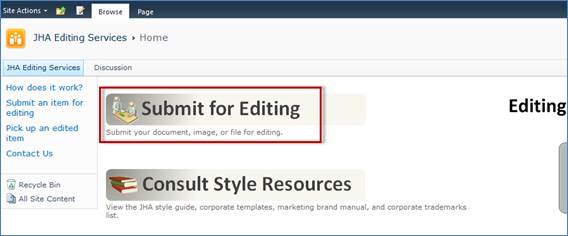
A few weeks ago, I introduced you to the great resources available on the JHA Editing Services page (see here for more information). Today, I’d like to remind you of the great editing services we offer to the whole company, including a new link for submissions to Symitar editors. Here’s how it goes:

1. You write a document that customers and clients are going to see (for example, an implementation guide, a proposal, a procedural checklist, a PowerPoint slide show).

2. You review your document to make sure it contains all of the information your audience requires.

3. You run spell-check and give it your final once-over.

4. Go to JHA Editing Services: https://teamsites.jackhenry.com/sites/jhaeditingservices/SitePages/Home.aspx

5. From the JHA Editing Services home page, click Submit for Editing.

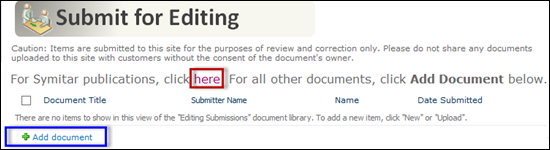
6. The Submit for Editing page appears.

· To submit something to the JHA editors, click Add document and follow the prompts to upload your document.

· To submit something to Symitar editors, click the here link. Instructions for submitting your documents via Outlook appear. Follow the instructions according to the type of document you are submitting.

7. The editors from both groups will work diligently to return your documents to you.

Note: If you are interested in the standards we adhere to, go to the Consult Style Resources link.

Kara Church

Technical Editor, Advisory

619-542-6773 | Ext: 766773

www.symitar.com

NOTICE: This electronic mail message and any files transmitted with it are intended
exclusively for the individual or entity to which it is addressed. The message,
together with any attachment, may contain confidential and/or privileged information.
Any unauthorized review, use, printing, saving, copying, disclosure or distribution
is strictly prohibited. If you have received this message in error, please
immediately advise the sender by reply email and delete all copies.

Posted by: Jack Henry | May 23, 2014

Editor’s Corner: Should

Happy Friday and a joyous three-day weekend to you!

Several of the Editor’s Corner topics over the last couple of years have included misheard phrases and misheard song lyrics, often with hilarious results. I wouldn’t call today’s topic hilarious, but it is based on mishearing. It is actually a peeve of several of your JHA co-workers, so be careful when you are saying or writing should have or should’ve.

Correct: John should have given her the smaller ring; the larger diamond looked obscene on her tiny finger.

Correct: I should’ve known better than to put Mentos® into that bottle of Diet Coke®.

Incorrect: She should of been more careful when feeding the zoo’s notorious spitting camel.

That’s it! That is the lesson. Don’t use of. Of is a preposition and has nothing to do with the present perfect verb should have.

Kara Church

Technical Editor, Advisory

619-542-6773 | Ext: 766773

www.symitar.com

NOTICE: This electronic mail message and any files transmitted with it are intended
exclusively for the individual or entity to which it is addressed. The message,
together with any attachment, may contain confidential and/or privileged information.
Any unauthorized review, use, printing, saving, copying, disclosure or distribution
is strictly prohibited. If you have received this message in error, please
immediately advise the sender by reply email and delete all copies.

Posted by: Jack Henry | May 22, 2014

Editor’s Corner: Social Media Vocabulary – S

Wow! TheBuilding Brand Character list of social media terms that begin with “S” is long!

· Scrape
Copying content from a site, often facilitated by automated bots.

· Search Engine
A program which searches a document or group of documents for relevant matches of a user’s keyword phrase and returns a list of the most relevant matches. Internet search engines such as Google and Yahoo search the entire Internet for relevant matches.

· SEM
Short for search engine marketing, SEM is often used to describe acts associated with researching, submitting and positioning a Web site within search engines to achieve maximum exposure of your Web site. SEM includes things such as search engine optimization, paid listings and other search-engine related services and functions that will increase exposure and traffic to your Web site.

· SEO
Short for search engine optimization, the process of increasing the number of visitors to a Web site by achieving high rank in the search results of a search engine. The higher a Web site ranks in the results of a search, the greater the chance that users will visit the site. It is common practice for Internet users to not click past the first few pages of search results, therefore high rank in SERPs is essential for obtaining traffic for a site. SEO helps to ensure that a site is accessible to a search engine and improves the chances that the site will be indexed and favorably ranked by the search engine.

· SERP
Search Engine Results Page

· Sentiment
A level of assessment that determines whether the tone of an article, blog post, tweet, or other content is positive, neutral, or negative.

· Share
Sharing is synonymous with posting or publishing. You can publish text, links, photos, videos, and events on Facebook using the share box at the top of your profile. After entering your text, you have the option to upload a photo, video, or insert a link.

· Share Button/Bar
A feature that people can add to their website or an email that will allow the content to be easily shared on a variety of social media sites.

· Site Map
A page or structured group of pages which link to every user accessible page on a website, and hopefully improve site usability by clarifying the data structure of the site for the users.

· Skype
A free program that allows for text, audio, and video chats between users. Additionally, users can purchase plans to receive phone calls through their Skype account.

· Snapchat
A social media app that allows users to snap a photo or video, add a caption and send it to their friends. After a certain amount of time, the photo disappears from their phone.

· Social Bookmark
A form of social media where users’ bookmarks are aggregated for public access.

· Social Media
Various online technologies used by people to share information and perspectives. Blogs, wikis, forums, social bookmarking, and user reviews and rating sites (digg, reddit) are all examples of social media.

· Spammer
A person who uses spam to pursue a goal.

· Splash Page
Often animated, graphics pages without significant textual content. Splash pages are intended to look flashy to humans, but without attention to search engine optimization, may look like dead ends to search engine spiders, which can only navigate through text links. Poorly executed splash pages may be bad for search engine optimization and often a pain for users.

· Static Page: A web page without dynamic content or variables such as session IDs in the URL. Static pages are good for search engine optimization work in that they are friendly to search engine spiders.

NOTICE: This electronic mail message and any files transmitted with it are intended
exclusively for the individual or entity to which it is addressed. The message,
together with any attachment, may contain confidential and/or privileged information.
Any unauthorized review, use, printing, saving, copying, disclosure or distribution
is strictly prohibited. If you have received this message in error, please
immediately advise the sender by reply email and delete all copies.

« Newer Posts - Older Posts »

Categories